

Jamstack: A Comprehensive Guide for Modern Web Development
By reading this, you’ll learn what Jamstack is, why teams choose it, how it works under the hood and in the cloud, plus new insights on sustainability, edge computing, accessibility, SEO trends in 2025, and migrating legacy platforms.
What Is Jamstack?
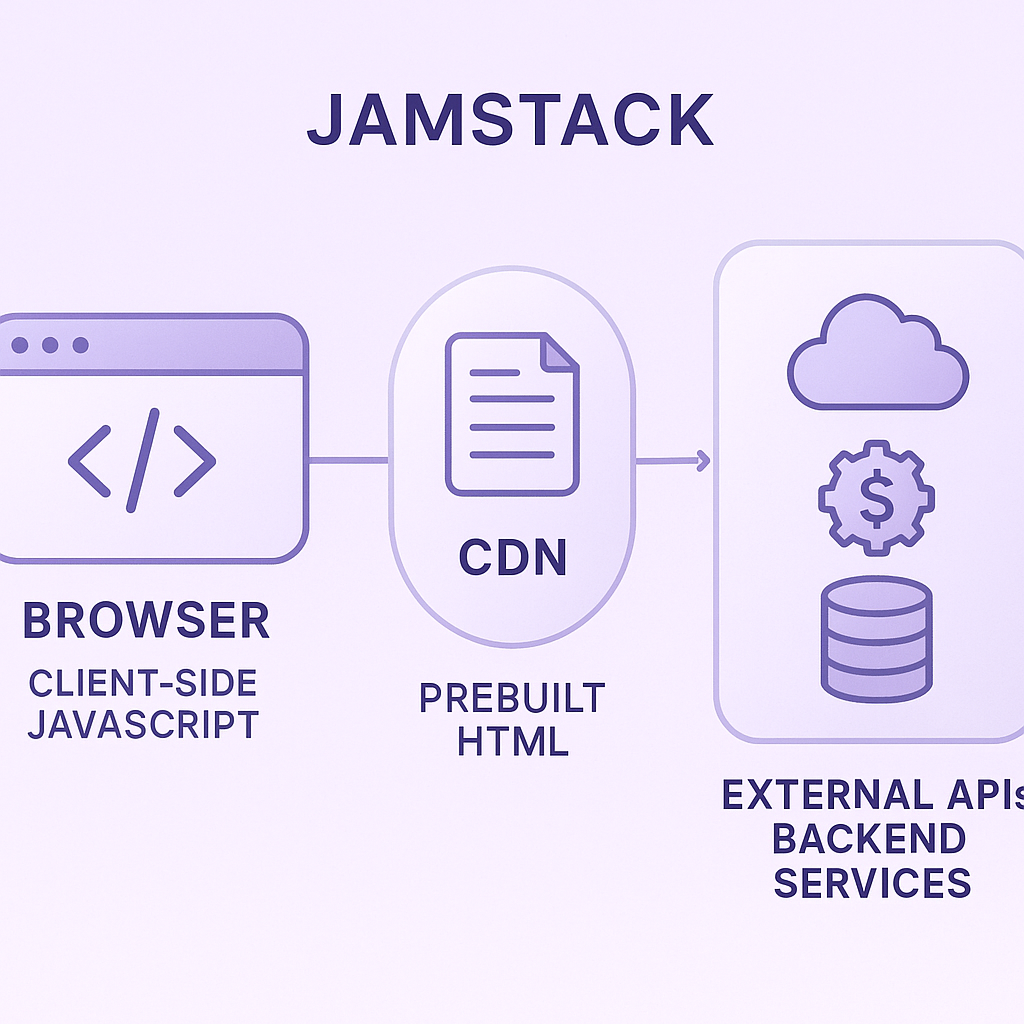
Jamstack is a web architecture built around client-side JavaScript, reusable APIs and prebuilt HTML markup. It separates (or “decouples”) the front end from the back end, delivering pages from a content delivery network rather than a monolithic server. This approach was popularized by Netlify’s JAMstack announcement in 2020.
Core Principles
Pre-rendering
Pages are generated at build time into static files, so users get fast, cached responses.
Decoupling
The front end and back end communicate via APIs or microservices, which can be managed independently.
API-driven
Reusable services (authentication, payments, search) live elsewhere, reducing maintenance on your own servers.
Benefits of Jamstack
Teams often choose Jamstack for:
Faster page loads when pre-rendered pages are small and well cached.
Fewer vulnerabilities, as highlighted by the OWASP Top 10 report emphasizing reduced attack surfaces.
Lower hosting costs when leveraging CDNs for distribution, such as AWS CloudFront pricing.
Better developer workflow with local builds and instant previews, exemplified by Gatsby’s preview functionality.
Easy scaling during traffic spikes, leveraging modern CDNs like Fastly’s edge compute network.
Benefit | Impact/Metric |
|---|---|
Faster page loads | Potentially faster delivery; measure against the existing site |
Fewer vulnerabilities | Reduced attack surface per OWASP Top 10 |
Lower hosting costs | CDN-based pricing savings |
Better developer workflow | Local builds & instant previews |
Easy scaling | Seamless CDN edge compute |
An Eco-Friendly Architecture
Serving cached files can reduce server work, but Jamstack alone does not establish a site's emissions. Estimate the footprint of an actual page with the Website Carbon Calculator and compare page weight, hosting and caching before claiming an environmental saving.
Tools and Technologies
Building a Jamstack site usually involves:
Static Site Generators (SSGs)
Examples: Gatsby, Next.js (static export), Hugo – learn more in this overview of static site generators.
Headless CMSs
Examples: Contentful, Sanity, Strapi – compare options at the Headless CMS directory.
CDNs
Services like Netlify, Vercel or Cloudflare Pages serve your prebuilt files globally.
Serverless / Edge Functions
Run custom code at the network edge with frameworks such as the Serverless Framework.
For a concrete, earlier implementation, see our KitaExpert architecture walkthrough (published in 2020). It describes a Gatsby app whose scheduled functions refresh data, whose pipeline rebuilds the site, and whose pages are deployed to S3 and distributed through CloudFront. Treat its specific tooling as an example of the workflow, not a current default stack.
For a closer look at one headless CMS in this architecture, read our Storyblok and Jamstack performance overview. It is an older overview, not a current reference for Core Web Vitals metrics.
Common Use Cases
Marketing and brochure sites
E-commerce catalogs and storefronts
Documentation portals
Blogs and personal portfolios
To decide whether pre-rendering fits your site, start with how often pages change and which experiences need per-user data. Mostly public, content-led pages are good candidates for a static pilot. If pages depend on live inventory, authentication or personalized responses, test those journeys separately and consider a hybrid or server-rendered approach rather than forcing every page into a static build.
For a marketing site, the architecture is only the starting point: choose a framework around your content workflow, required interactivity and maintenance needs. Compare those trade-offs in our Astro and Next.js marketing-site comparison before choosing an implementation.
Planning a marketing site? See our Storyblok and Astro marketing-site guide for a concrete static-first setup with a headless CMS.
The Role of Edge Computing
As Jamstack grows, edge computing ties in by running functions at CDN nodes. You can execute light personalization, A/B tests or geo-routing within milliseconds of the user:
Cloudflare Workers let you run JavaScript at the edge with global distribution and sub-millisecond response times.
Netlify Edge Functions integrate directly into your build and deploy flow.
Provider | Key Feature | Response Time | Integration |
|---|---|---|---|
Cloudflare Workers | Global distribution | Sub-millisecond | Standalone edge functions |
Netlify Edge Functions | Build/deploy integration | Millisecond-range | Built into Netlify pipeline |
This reduces latency and offloads work from origin servers.
Accessibility Considerations
Pre-rendered pages help screen readers by delivering semantic HTML instantly. But if you rely heavily on client-side hydration:
Invisible loading spinners or missing ARIA attributes can confuse assistive tech.
Always test the “no-JavaScript” experience to ensure content and navigation remain accessible.
Tip: Run Deque University accessibility testing and manual screen-reader tests before deploying.
SEO Advances in 2025
Search engines have improved their handling of JavaScript, but static HTML still offers a head start. According to Google Developers, bots now run a modern Chrome engine when crawling JS. That said:
Pre-rendered content ensures critical metadata is immediately available.
Use structured data (JSON-LD) in your HTML to help search engines identify products, articles or events.
Implement `rel="preload"` for key assets to speed up perceived load time.
If your Jamstack site uses a headless CMS, pre-rendering is only part of the SEO check. For steps to verify rendered content, canonicals and sitemaps on published pages, read our headless CMS SEO guide.
Migrating Legacy Systems to Jamstack
Switching from a monolithic CMS or server-rendered site can introduce challenges:
Authentication workflows often need rethinking—for example, Auth0’s authentication platform.
Dynamic functionality (search, comments) must move to API-driven services.
Build times grow with large sites—consider incremental or on-demand builds (e.g., Next.js Incremental Static Regeneration).
For a migration proof of concept, rebuild one representative page and test editorial previews, integrations, page speed, URL redirects and analytics before choosing the rendering approach for the whole site. If you are planning a marketing-site or CMS rebuild, see how Makers’ Den handles headless CMS website development and migration.
Your Jamstack Journey
You now have a holistic view of Jamstack’s architecture, tools and real-world considerations—from energy impact to edge functions, accessibility, SEO trends and migration pitfalls. Pick a small section of your existing site to rebuild, measure the gains and iterate. With each release you’ll refine performance, cut costs and create a modern experience your users (and the planet) will appreciate.


