:format(webp))
:format(webp))
How Long Does It Really Take to Build an MVP?
An MVP can take weeks or months, depending on what must work for the first users. A tightly scoped pilot with ready integrations is a different project from a public product with several user roles, new infrastructure and external approvals. A useful estimate defines that first release before assigning it a date.
For a small line-of-business application, a two-to-eight-week first iteration can be a planning target when the workflow is narrow, decisions are available and dependencies are understood. Treat it as a scope discussion, not a guarantee or an industry average. The examples below show how to test whether a short timeline is realistic.
If you need a team to turn that first release into working software and improve it after launch, our product engineering service covers that work.
Typical MVP Timeline
Use these scenarios to frame a conversation with your delivery team. They are illustrative planning ranges, not survey results, price offers or commitments.
First release | Illustrative planning range and assumptions |
|---|---|
Prototype or manual pilot | 1–2 weeks to test one journey; may use mock data or manual operations and is not production-ready by default |
Narrow web MVP | 4–8 weeks with one main workflow, known integrations, an available team and prompt product decisions |
Broader product MVP | 3–6 months or more when several workflows, platforms, data migrations or external dependencies must be delivered together |
If your deadline is under a month, decide first whether you need a demonstration, a controlled pilot or a production release. A weekend target is better framed as a prototype or manually supported test, not an assumed public launch. For a startup MVP, check integration access, the essential user journey, release checks and any external approvals before committing to a date. If those cannot fit, reduce the pilot scope and set a separate date for the production release.
A longer roadmap does not have to delay every learning opportunity. Ask what one group of users can try earlier, and name the capabilities deliberately excluded from that pilot. Keep separate dates for a prototype, a controlled pilot and a public launch.
Key Stages of MVP Development
These activities overlap. Discovery, testing and user feedback should continue as the product takes shape rather than appearing only at the beginning or end.
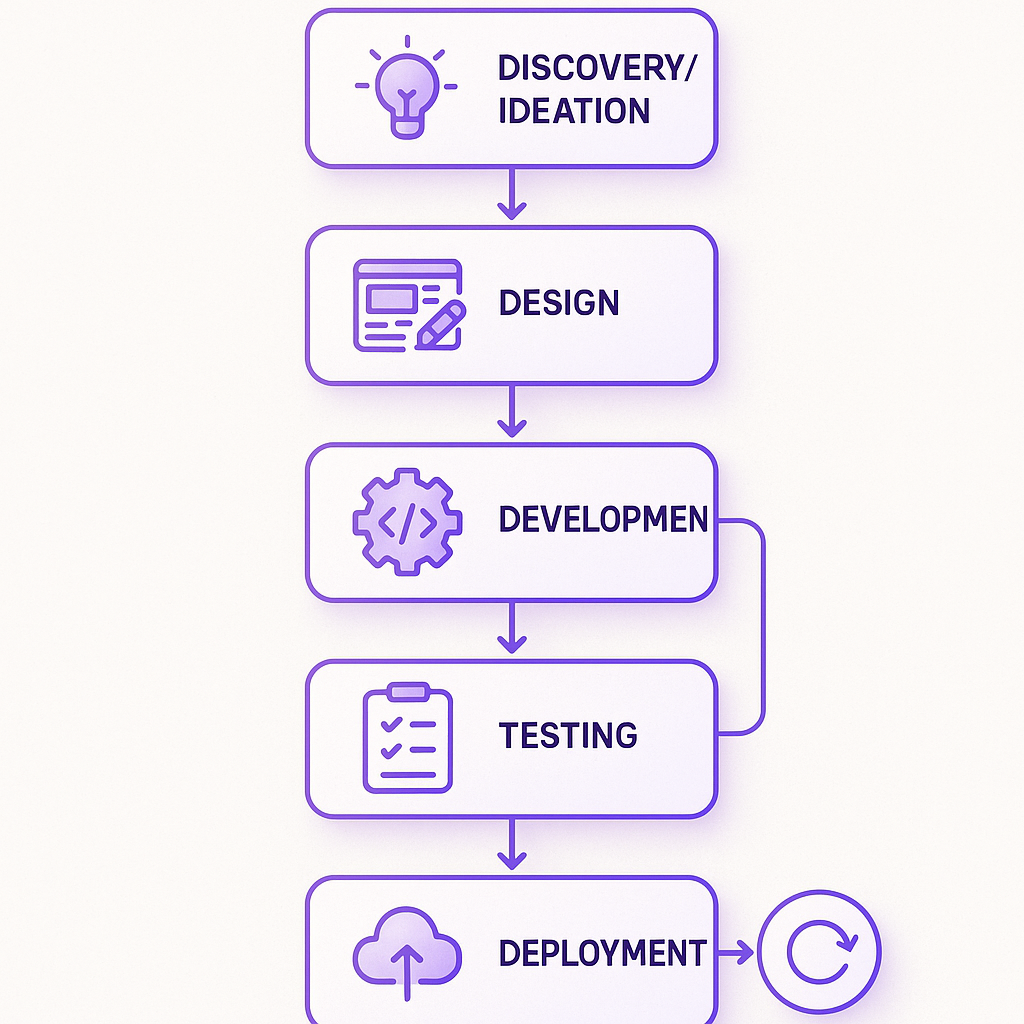
Discovery: identify the user, problem, decision to test and smallest useful workflow. Resolve the riskiest assumptions.
Design: map the journey and include empty, error, loading and permission states. Test unclear interactions before building them fully.
Development: build a thin path through the interface, backend and necessary integrations, then expand it.
Testing: check important journeys throughout delivery, including access rules, failure handling and supported devices.
Deployment: prepare environments, monitoring, support responsibilities and a way to recover from a failed release.
Iteration: observe actual use, review feedback and decide whether to improve, expand, change direction or stop.
An Illustrative Six-Week MVP Plan
Suppose an internal operations tool needs sign-in, a single user role, a work queue, record updates and one documented API integration. Assume an existing identity service, usable API access on day one, one available product decision-maker and a small experienced team. Exclude payments, offline use, a mobile app and historical data migration.
Week | Output and decision |
|---|---|
1 | Agree acceptance criteria, test the integration and confirm whether the six-week scope remains credible |
2 | Demonstrate one complete workflow using real integration data |
3–4 | Complete the agreed workflow, permissions, error states and automated checks |
5 | Run a controlled user pilot and address release-blocking findings |
6 | Finish launch checks, hand over operations and agree the next learning cycle |
This is an example of sequencing, not a claim that all MVPs fit six weeks. If week one reveals a missing API capability, revisit the release scope and date immediately. Do not silently consume the time reserved for testing and pilot feedback.
How a Mobile App MVP Changes the Timeline
A mobile MVP needs its own scope and release plan. The six-week web example above explicitly excludes a mobile app; adding iOS and Android introduces platform testing and release work even when application code is shared.
Prove the riskiest native integration early, including required SDKs, device permissions and behavior on real phones.
Define offline requirements explicitly: local data, queued actions, synchronization and recovery after connectivity returns.
Include checks on supported iOS and Android devices, with accessibility, interruptions and failed-network states.
Prepare store accounts, signing, screenshots, privacy information and reviewer access. Keep submission and public availability as separate milestones, with room to address review feedback.
A controlled pilot may have a different distribution path from a public launch. Agree how pilot users will receive the app and who owns release operations before setting the date. Compare native and cross-platform implementation against the actual requirements, rather than applying a universal mobile development multiplier.
For help scoping and delivering that first mobile release, see our mobile app development service.
Factors That Shape Your MVP Schedule
Factor | What to establish before committing |
|---|---|
Scope and feature set | Which user journey must work, and what is explicitly deferred? |
Team availability | Who is allocated, at what capacity, and with which competing commitments? |
Integrations and data | Are credentials, documentation, test data and an integration owner available? |
Quality and operations | What must be tested, monitored, supported and recoverable for this release? |
External decisions | Which approvals, procurement steps or reviews can block launch? |
Product decisions | Who can answer questions and accept scope tradeoffs promptly? |
Adding engineers does not divide the calendar duration evenly. Some work is sequential; people need context; external teams may be the real bottleneck. Map dependencies and availability before turning effort into dates.
Where specialist reviews or external approvals are needed, establish the requirements and lead times with their owners. Adding a generic number of months to every regulated product is not a useful scheduling method.
How to Speed Up Your MVP Build
Choose one useful workflow and a specific pilot audience. Put everything else in a visible deferred-scope list.
Investigate risky integrations early with real credentials and representative data.
Use tools and components the team can maintain, and reuse existing identity, design or hosting capabilities where they fit.
Review working software frequently with someone empowered to decide. Resolve ambiguity while changes are still small.
Trade scope openly when the date is fixed. Keep essential access controls, recovery and release checks in the plan.
Reuse Components Without Expanding the MVP
Before commissioning a new design system, inventory the forms, navigation, tables and feedback states you can reuse. Check them against the pilot journey, including keyboard use, validation, empty states and errors. A small set of documented React components may be enough for the first release; building a complete component library is a separate scope decision.
Ask the delivery team to demonstrate one reused component in the real workflow and explain what still needs custom work. Record that assumption in the estimate. Reuse can reduce repeated implementation, but it does not remove integration, testing or accessibility work.
No-Code and Low-Code Platforms
A no-code tool can help test a workflow or run an early pilot, especially when manual operations are acceptable. Evaluate its limits with a representative task before choosing it: permissions, integration behavior, data export, accessibility, recurring costs and the work needed if the pilot becomes a permanent product.
Distinguish a clickable demonstration from a service that stores real user data and needs support. The latter still needs clear ownership, error handling and a release decision.
Pitfalls That Can Stall Your MVP
Scope creep: treating every pilot request as a condition of first launch.
Hidden dependencies: scheduling development before access, data or an external approval is available.
Unclear acceptance: stakeholders disagreeing about what counts as usable.
Late integration: completing isolated screens before testing the end-to-end journey.
No product owner: questions waiting days for a decision.
An unsupported launch: shipping without anyone responsible for incidents or feedback.
Connect the Timeline to the Budget
Estimate the effort for the agreed scope by role, then apply the relevant rates. Include discovery, design, engineering, testing, release work and coordination once. Add non-labor costs and an explicit allowance for identified risks. Waiting for an external decision can extend the calendar without adding the same amount of engineering effort.
Ask the supplier to show assumptions, exclusions and a checkpoint for updating the forecast. Our software project estimation guide explains a work breakdown and worked budget example.
Make Handover Part of the Launch Plan
Agree who will operate the product and make the next release before development starts. Keep repository, hosting and integration access under the agreed company accounts. Include setup instructions, deployment and recovery steps, known limitations, and a short list of the checks that protect the main user journey.
Make the handover demonstrable: have the receiving team run the application, release a small change and locate the relevant monitoring with the documentation provided. Clarify support availability and ownership of remaining work. If these activities must happen before launch, include them in the schedule and budget.
For selecting the delivery partner, use our ReactJS agency buyer checklist to compare team continuity, delivery evidence and handover expectations.
What Happens After You Ship Your MVP?
Decide before launch what evidence will guide the next investment. For an internal tool, that might be whether the target users complete the workflow without assistance and whether manual corrections fall. For a customer-facing product, it might be completion of the core journey and repeat use by the intended audience.
Record what you observe, combine it with user conversations and choose the next small release. More features are one possible response; simplifying the workflow, changing the audience or stopping can be valid outcomes too.
Your Next Sprint
Write down the user, first workflow, launch conditions, dependencies and budget boundary. Ask your delivery team for a range with assumptions and the earliest checkpoint that could change it. That gives you a plan you can manage.
Makers’ Den can help define and build the first useful release through product engineering. For a React-based application, see our ReactJS development service. Tell us what you want to put in users’ hands.
:format(webp))
:format(webp))
:format(webp))