Building a Future-Proof Marketing Website with Storyblok and Astro
In this guide, you’ll see how to combine the headless CMS Storyblok with the modern static site generator Astro to deliver a blazing-fast marketing site. You’ll get an end-to-end setup, plus advanced tactics—performance budgets, edge rendering, governance, localization, SEO, theming, release workflows and more—that top tutorials often skip.
Choosing a frontend approach? This guide focuses on Astro’s mostly static pages and selectively hydrated islands. If your project instead calls for a React-centered implementation, see the Storyblok and React marketing-site guide for that path.
Why Storyblok and Astro Make Sense
Storyblok and Astro solve two key needs:
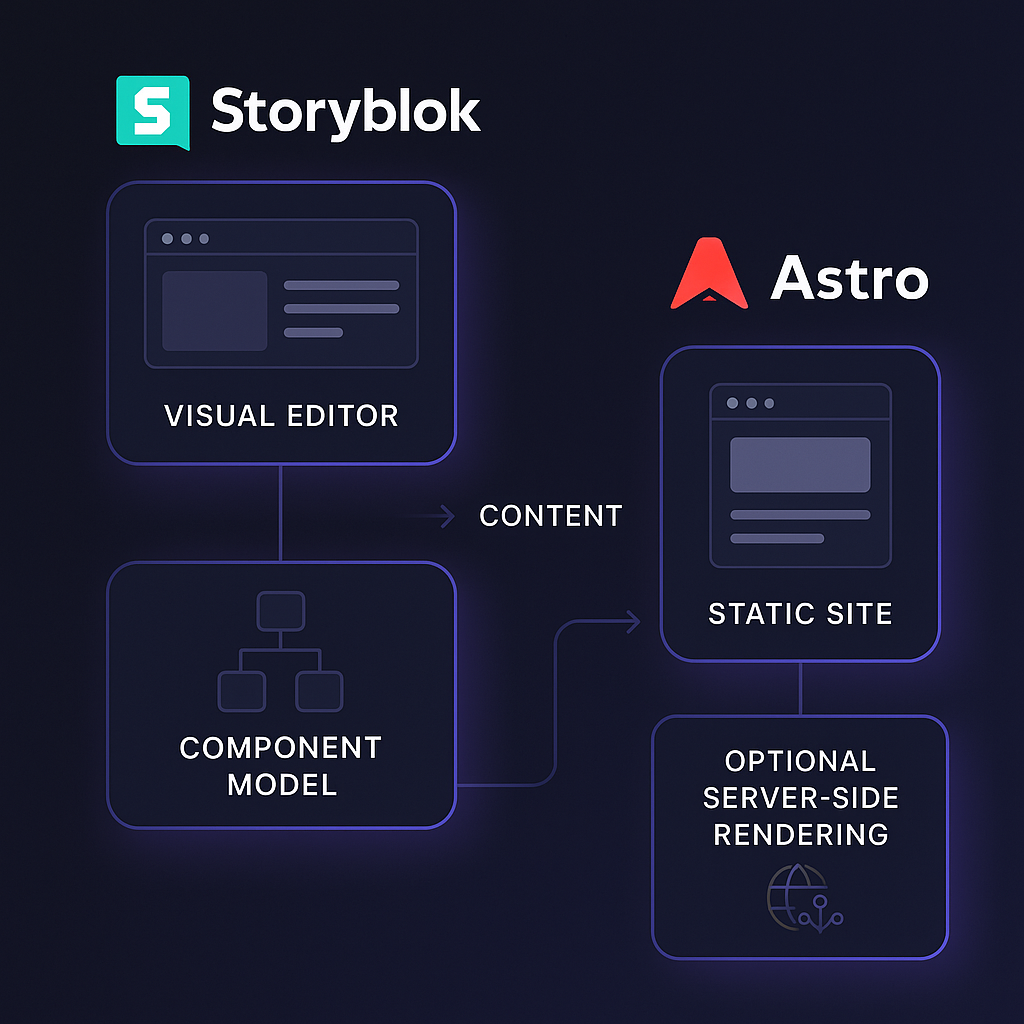
Content autonomy: Storyblok’s visual editor and component-based modeling let marketers update content without developer help.
Minimal frontend overhead: Astro ships zero JavaScript by default and hydrates only the interactive “islands” you choose.
Ultra-fast performance: Static prerendering plus optional server-side rendering at the edge keeps TTFB low and Core Web Vitals in check.
For more background on the performance concepts, read our Storyblok and Jamstack Core Web Vitals overview. For a different marketing-site implementation, see how MeisterTask used Next.js and Storyblok; that case study is an example, not a performance comparison with Astro.
Still choosing a CMS for your Astro marketing site? Compare the editorial workflow and backend ownership tradeoffs in our Payload and Astro CMS decision guide before committing to a setup.
Already running your marketing site on Next.js? See our Next.js-to-Astro migration guide for the steps involved, then read the Perk rebuild case study for an example of migrating a Storyblok-backed marketing site while retaining its content model.
Creating Your Astro + Storyblok Project
Scaffold an Astro site (name the project `my-marketing-site` in the wizard)
npm create astro@latest
cd my-marketing-site
Install the Storyblok integration
npm install @storyblok/astro@latest
Configure `astro.config.mjs`
  import { defineConfig } from "astro/config";
import { storyblok } from "@storyblok/astro";

export default defineConfig({
  integrations: [
    storyblok({
      accessToken: "YOUR_ACCESS_TOKEN",
      apiOptions: { region: "eu" },
      components: { page: "storyblok/Page" },
    }),
  ],
});
Fetch content in your page
  import { useStoryblokApi } from "@storyblok/astro";

const sbApi = useStoryblokApi();
const { data } = await sbApi.get("cdn/stories/home", { version: "published" });
Render Storyblok components in your `.astro` templates: import `StoryblokComponent` from `@storyblok/astro/StoryblokComponent.astro` and render `<StoryblokComponent blok={data.story.content} />`. Register each block’s technical name and Astro component path in the integration’s `components` map; the `page` mapping above assumes a matching `src/storyblok/Page.astro` component.
Component Modeling and Experimentation
Design your content schema with these in mind:
A/B/n variants & feature flags
Add fields like `experimentKey` and `variant` so you can run A/B testing without code changes.
Schema constraints & validations
Enforce required fields, character limits, or regex patterns in Storyblok’s UI to ensure clean data[^3], similar to JSON Schema validation.
Versioning & migrations
Use the Storyblok Management API to script content-type updates and deprecations safely.
Performance Budgets and Edge Rendering
To catch regressions early and serve users around the globe:
Core Web Vitals SLOs
Set Largest Contentful Paint (LCP) ≤ 2.5 s, INP ≤ 200 ms, and CLS ≤ 0.1 as your thresholds.
Metric | Threshold |
|---|---|
Largest Contentful Paint (LCP) | ≤ 2.5 s |
Interaction to Next Paint (INP) | ≤ 200 ms |
Cumulative Layout Shift (CLS) | ≤ 0.1 |
RUM-driven alerts
Track field Core Web Vitals with a real-user monitoring tool or the Web Vitals JS library. Run a separate synthetic performance test in CI to catch regressions; real-user measurements cannot be collected from the build under test.
Static + selective SSR at the edge
Prerender shared marketing pages. For routes that need request-time personalization, install an adapter for your deployment platform (for example, `@astrojs/cloudflare` on Cloudflare) and use `export const prerender = false` on those routes. For personalized fragments within a prerendered page, use server islands with `server:defer` and an adapter. Measure TTFB in your target regions rather than assuming a worldwide latency guarantee.
Visual Editor Governance & Localization at Scale
Give marketers freedom without chaos:
Field-level validations & workflows
Role-based permissions ensure only approved users publish key pages.
Multilingual setup
Leverage Storyblok’s AI Translations with language fallbacks. In Astro, generate `[lang]/[...slug].astro` routes and automate `hreflang` tags.
Component-level guidelines
Add rich-text character counts, alt-text requirements, or image aspect ratio rules directly in the schema.
SEO, Accessibility & Image Strategy
Drive organic traffic and comply with standards:
CMS-driven metadata
Store slugs, canonicals, Open Graph, and JSON-LD schema blocks in Storyblok; use Astro hooks to inject them per page or block.
Image Service + responsive formats
Use Storyblok Image Service to output AVIF/WebP, DPR-aware `srcset`s, art-direction fields, and low-CLS placeholders.
Built-in accessibility
Define alt text and captions fields on every image block. Wrap headings in an Astro component that enforces a logical hierarchy and includes WCAG guidelines for screen readers.
Theming, Caching & Release Management
Keep your site consistent and deploy confidently:
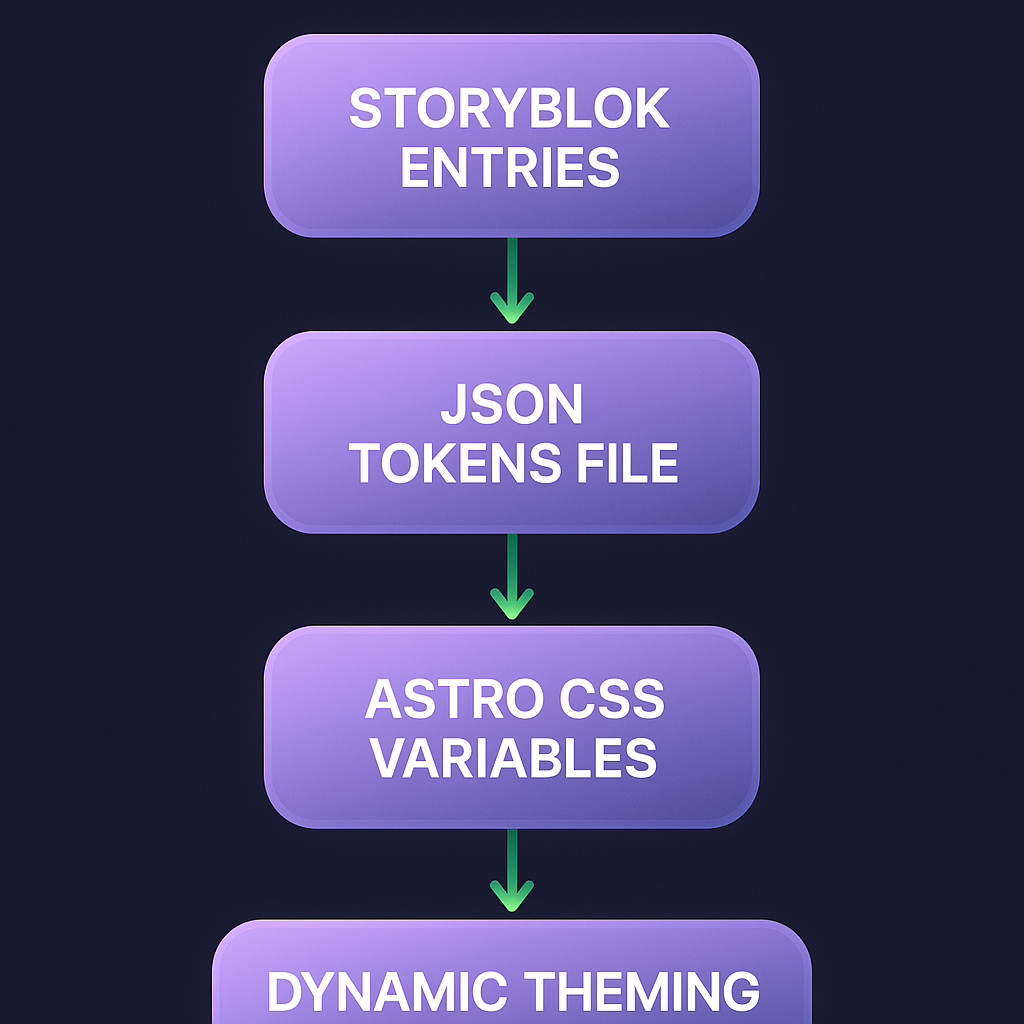
Design tokens pipeline
Sync style entries (colors, fonts) from Storyblok to a JSON file that your Astro CSS variables consume, enabling dark mode CSS variables or campaign skins.
Incremental content caching
Configure Storyblok webhooks to trigger selective Astro rebuilds or “ISR-like” revalidation. Use cache tags and `stale-while-revalidate` on your CDN.
Drafts, previews & safe rollbacks
Secure preview mode with token-guarded endpoints. Pair Storyblok Releases with Astro preview deployments so you can rollback both code and content instantly on failures.
Final Pit Stop
You now have a complete blueprint: from initial setup to advanced edge-rendered personalization, performance-budget gating, governance rules, localization, SEO-first routing, theming, caching strategies, and release controls. By combining Storyblok’s flexible content platform with Astro’s lean, island-based architecture, you deliver marketing sites that load fast, adapt globally, and empower teams—all while keeping developer overhead low. Happy building!